
ShipPrime
ShipPrime is a logistics service provider offering domestic shipping solutions for e-commerce businesses. It provides reliable last-mile delivery services with real-time tracking capabilities.
Courier Partner ID: 746
Services Integrated
- Order Creation
- Order Cancellation
- Tracking via Polling
- Tracking via Webhooks
Steps to Set Up ShipPrime on Clickpost
-
First, complete the process of setting up a courier partner account by following the steps outlined here: Create a Courier Partner Account
-
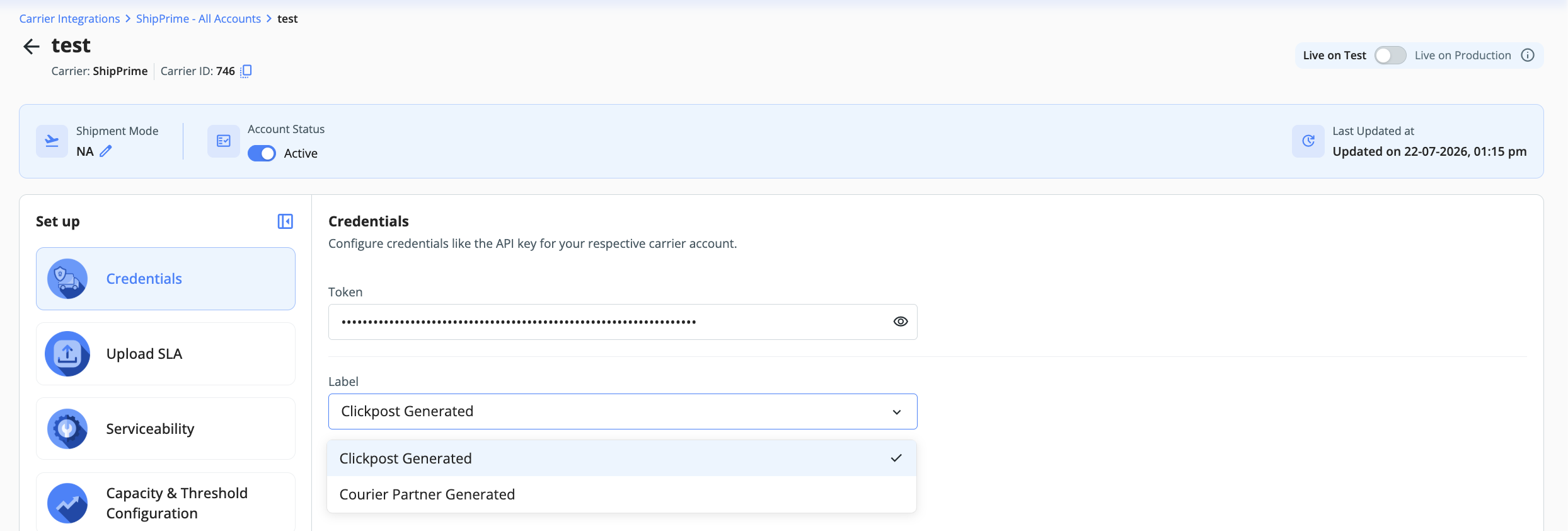
Once your account is created, navigate to Carrier Integrations → ShipPrime and open your account configuration. You will land on the Credentials screen.
-
Here, you can add the credentials as shared by the ShipPrime team:
| Field | Description |
|---|---|
| Token | The API authentication token provided by ShipPrime. Obtain this from your ShipPrime account manager or the ShipPrime dashboard. |
| Label | Select how labels are generated for ShipPrime shipments. Two options are available: Clickpost Generated — labels are generated by Clickpost; Courier Partner Generated — labels are fetched directly from ShipPrime's system. |
- Once all credentials are filled in, click Submit. Your ShipPrime account will be active and ready to use on Clickpost.
Notes
- For the Label field, select Clickpost Generated if you want Clickpost to handle label generation centrally. Select Courier Partner Generated if ShipPrime should generate and return the label directly via their API.
Updated 4 months ago
Did this page help you?