
DHL DGF
Configure DHL DGF INT as a courier partner in Clickpost, including required credentials, prerequisites, and troubleshooting guidance.
DHL DGF (Dalsey, Hillblom, and Lynn – Delivered Goods Forward) is a global logistics and freight forwarding service provided by DHL. It specializes in international shipping, offering air, ocean, and road freight solutions for businesses handling cross-border trade and B2B shipments.
Courier Partner ID: 731
Services Integrated
- Order Creation
- Tracking via Polling
- Tracking via Webhooks
- Label Generation
Prerequisites
Before you configure DHL DGF INT in Clickpost:
- Create a courier partner account in Clickpost: Create a Courier Partner Account.
- Collect the required DHL DGF credentials and account identifiers from your DHL DGF relationship manager.
- Confirm your export and customs details, including IEC, bank AD code, bank account details, shipment type, and any destination-specific compliance fields.
Steps to Set Up DHL DGF INT on Clickpost
-
First, complete the process of setting up a courier partner account by following the steps outlined here: Create a Courier Partner Account
-
Once your account is created, navigate to Carrier Integrations → DHL DGF INT and open your account configuration. You will land on the Credentials screen:
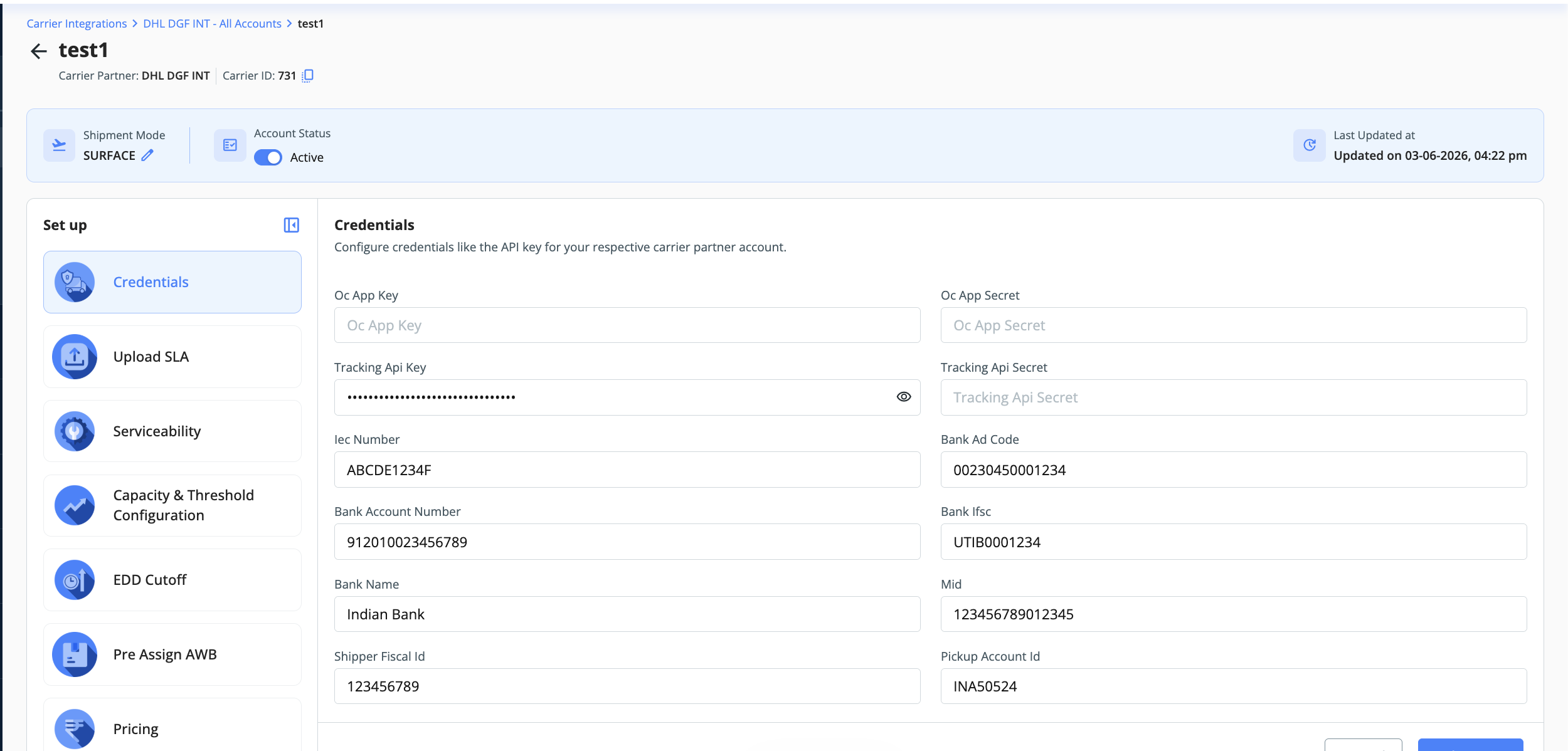
Here, you can add the credentials as shared by the DHL DGF team. To give you a brief:
| Field | Example / Source | Description |
|---|---|---|
| Oc App Key | Provided by DHL DGF | The application key provided by DHL for API authentication. Obtain this from your DHL DGF relationship manager. |
| Oc App Secret | Provided by DHL DGF | The application secret paired with the Oc App Key, used to authenticate API requests. |
| Tracking Api Key | Provided by DHL DGF | The API key is used specifically for tracking shipments via DHL DGF's tracking endpoints. |
| Tracking Api Secret | Provided by DHL DGF | The secret is associated with the Tracking API Key for secure tracking API calls. |
| IEC Number | Use your registered IEC | Importer Exporter Code: A 10-character alphanumeric code issued by the Directorate General of Foreign Trade (DGFT), required for international shipments. |
| Bank Ad Code | Use your bank-issued AD code | A 14-digit code assigned by the bank for foreign exchange transactions. Required for customs and export documentation. |
| Bank Account Number | Use your business account | The bank account number associated with your business is used in export documentation. |
| Bank IFSC | Use your bank branch IFSC | The IFSC (Indian Financial System Code) of your bank branch is used in financial and export filings. |
| Bank Name | Use your business bank name | The name of your business's bank. |
| MID | Provided by DHL DGF, if used | Merchant ID assigned by DHL DGF for identifying your account in their system. (Only for US-bound shipments) |
| Shipper Fiscal ID | Use your shipper tax ID | The fiscal/tax identification number of the shipper is used in customs and compliance documentation. |
| Pickup Account ID | Provided by DHL DGF | The pickup account identifier provided by DHL DGF to associate pickups with your account. |
| Sold To Account ID | Provided by DHL DGF | The account ID of the entity to whom the shipment is sold/billed. Typically provided by your DHL DGF account manager. |
| Shipment Type | CSBIV or CSBV | Defines the shipment category. CSBIV refers to Courier Shipment Business — used for cross-border e-commerce shipments under the CSB-IV scheme. |
| National ID Type | Confirm with DHL DGF | The type of national identification used for the consignee is required for customs compliance on international shipments. |
| Product Code | Provided by DHL DGF | The DHL product code represents the service type. Provided by your DHL DGF account team. |
- Once all credentials are filled in, click Submit. Your DHL DGF INT account will be active and ready to use on Clickpost.
Troubleshooting
If the DHL DGF INT account does not activate or order creation fails:
- Verify that each API key and secret matches the credentials shared by DHL DGF. Do not reuse order creation credentials for tracking unless DHL DGF has explicitly provided the same values for both.
- Confirm that export details such as IEC number, bank AD code, bank account number, and IFSC are complete and registered to the business shipping the order.
- For US-bound shipments with T11 clearance, confirm that the MID value is available and passed in the
marketplaceURLfield in JSON format. - For CSB IV, CSB V, and GCC shipments, confirm the destination-specific customs fields with DHL DGF before retrying the shipment.
Notes
- Labels are generated by DHL for DHL DGF INT orders.
- The AWB will be generated after the pickup. Customer Shipment ID acts as AWB in ClickPost.
- ⚠️ US Destination / T11 Clearance: If the destination is the US and the customs clearance type is T11, the customer must provide the MID value. This value must also be passed in the marketplaceURL field in JSON format.
- Indian CSB IV / CSB V — API Integration Fields For shipments under India's CSB IV (Courier Shipment Business scheme for e-commerce exports up to ₹25,000) or CSB V (up to ₹10 lakh), certain fields carry specific compliance and customs requirements. Pay close attention to these when integrating via the DVT API.
- GCC Country Requirements: For GCC destinations (e.g., Saudi Arabia, UAE, etc.), Customs clearance requirements vary by destination country and service.
- 📎 For the full DHL field reference, see: https://dhl1.portal.swaggerhub.com/dconnectordhlcom-en/docs/e2-e-service-in
Updated 5 months ago