
IndiaPost
India Post is the government-operated postal system of India, functioning under the Ministry of Communications. Founded in 1854, it has grown into the widest postal network in the world, connecting indian domestic shipment across all Tier 1, 2, 3 cities.
Courier Partner ID: 438
Services Integrated
- Order Creation
- Label Generation
- Tracking via Polling
- Tracking via Webhook
Steps to setup India Post on Clickpost
- Firstly, complete the process of setting up a courier partner account by following the steps: https://docs.clickpost.ai/docs/create-an-courier-partner-account
- Post #1, you'll be greeted with the following screen
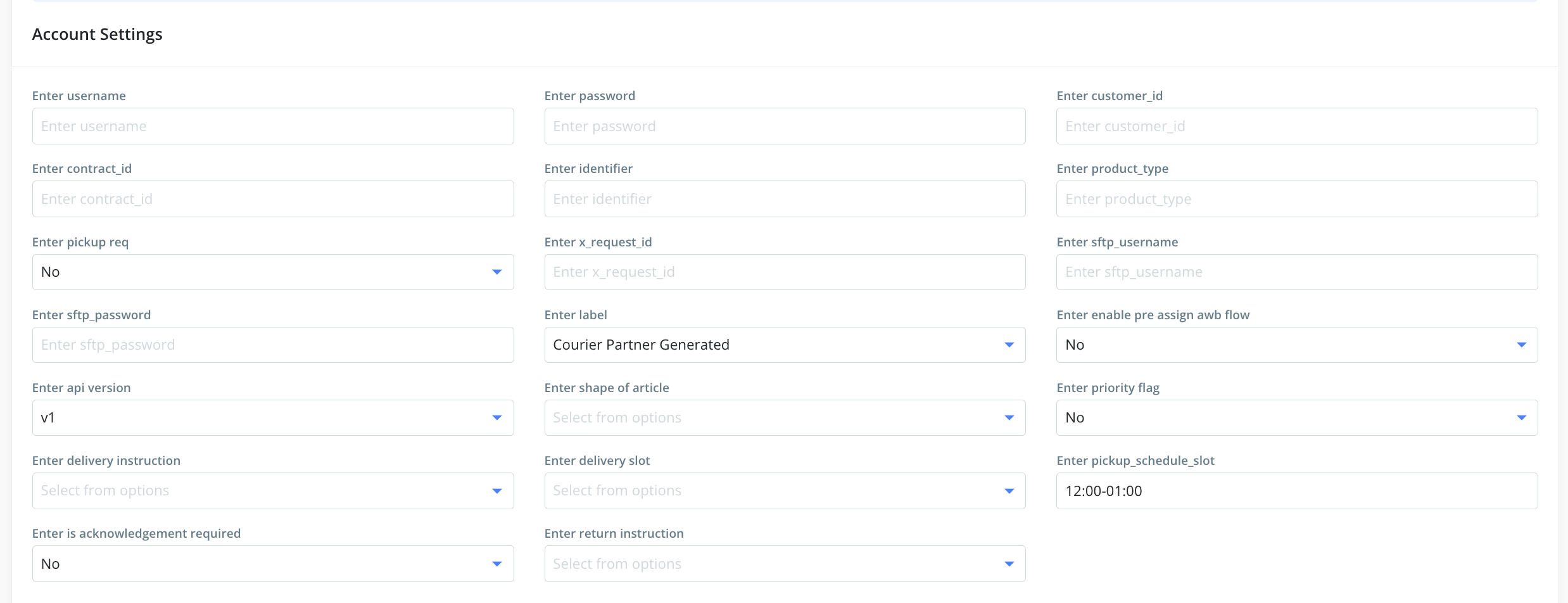
Here, you can add the credentials as shared by the India Post team. Based on the version, the following are the fields to configure:
| Name | Value | API Version/ Flow | Description |
|---|---|---|---|
| Enter username | 328427834 | V1 - SFTP V2 - REST | The unique username or client name provided by India Post. (Mandatory for both) |
| Enter password | Dop@abcdghje | V1 - SFTP V2 - REST | The API password associated with your account. (Mandatory for both) |
| Enter customer_id | 328427834 | V1 - SFTP V2 - REST | The unique Customer ID used for order identification. (Mandatory for both) |
| Enter contract_id | 0007347746 | V1 - SFTP V2 - REST | The specific contract identifier assigned to your account. (Mandatory for both) |
| Enter identifier | 80008876 | V1 - SFTP | A unique identifier often used for specific warehouse locations. (Mandatory for V1) |
| Enter product_type | SP | V1 - SFTP V2 - REST | The shipping mode (e.g., SP for Speed Post, BP for Buisness Post). |
| Enter pickup req | No | V1 - SFTP V2 - REST | Select 'Yes' to trigger a pickup request. Values: Yes/No. |
| Enter x_request_id | 1b2bn-34l95 | V1 - SFTP | The API password associated with your account. (Mandatory for V1) |
| Enter sftp_username | zrtst_dabcdh | Username for SFTP data synchronization if required. (Non Mandatory) | |
| Enter sftp_password | Dbsth@3456* | Password for the SFTP account access. (Non Mandatory) | |
| Enter label | Courier Partner Generated | V1 - SFTP V2 - REST | Choice of label generation. Possible values:
|
| Enter enable pre assign awb flow | Yes | V1 - SFTP V2 - REST | Enables the flow to assign AWB numbers before manifest completion. |
| Enter api version | v2 | V1 - SFTP V2 - REST | Select the API version provided by the carrier |
| Enter shape of article | DOC | V2 - REST | Type of item being shipped (e.g., DOC for document) |
| Enter priority flag | No | V2 - REST | Indicates if the shipment requires priority handling. Values: Yes/No. |
| Enter delivery instruction | OD | V2 - REST | Codes for special delivery instructions (e.g., OD for Open Delivery, SD for Same day). |
| Enter delivery slot | 2pm-5pm | V2 - REST | Preferred time window for final delivery. If "pickup req" is set to no. |
| Enter pickup_schedule_slot | 12:00-01:00 | V2 - REST | Scheduled window for the courier to pick up the parcel. If "pickup req" is set to yes. HH:MM - HH:MM |
| Enter return instruction | RTA | V2 - REST | Instructions for undelivered packages (e.g., RTA for Return to Alternate Address, RTS for Return to Sender). |
- Once done, kindly press Submit, and you have set up Indiapost on Clickpost.
- Configure pre-assigned awbs by uploading them for each account. Steps to upload Pre-assigned AWBs in Clickpost: https://docs.clickpost.ai/docs/courier-partner-integration
Note:
- AWB Generation: You need to configure pre-assigned AWBs.
- Labels: Both India Post & Clickpost labels are supported. Brands can choose their preference in the credentials.
Updated 7 months ago
Did this page help you?